Streamline Your Meetings with Dune: The Mini Keypad for Effortless Shortcuts
Discover how Project Mirage's Dune mini keypad can streamline your meeting experience with customizable shortcuts for various applications.
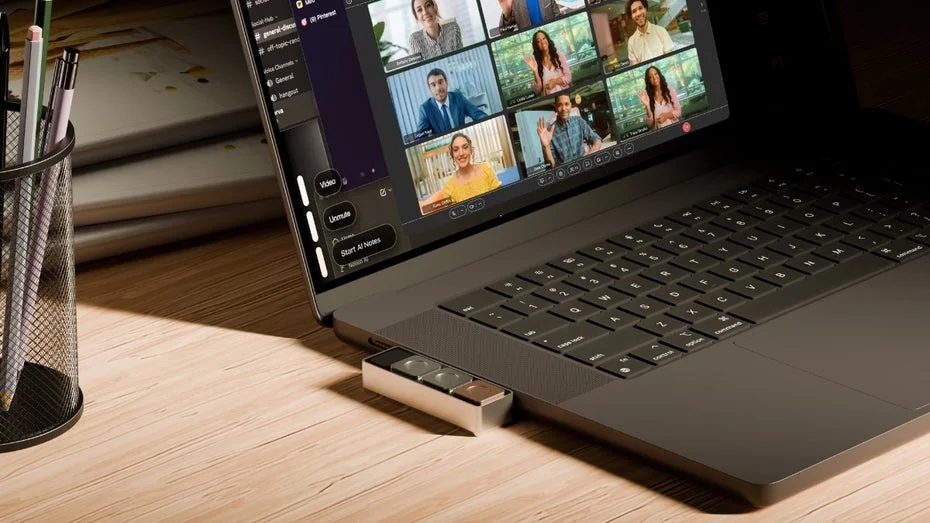
In the fast-paced world of digital meetings, managing multiple applications can be a challenge. The new gadget from Project Mirage, called Dune, aims to simplify this experience by offering a compact keypad that adapts to the app you are using, allowing for seamless control of meetings with just a push of a button.
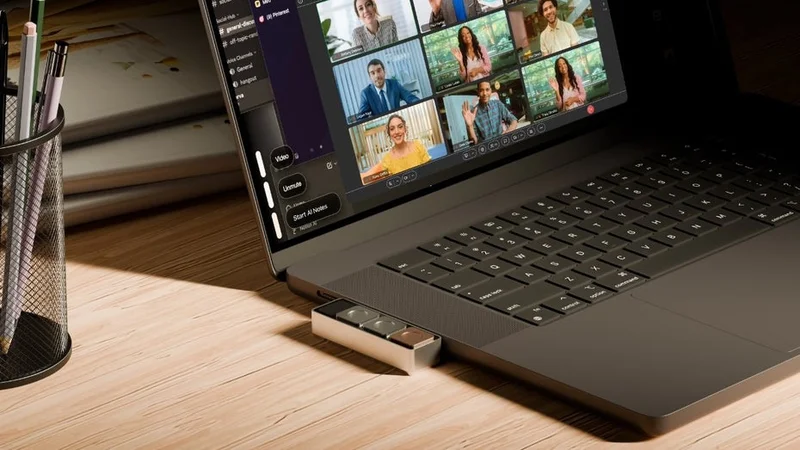
Switching between platforms like Teams and Zoom often requires memorizing various shortcuts, which can be cumbersome. Dune seeks to alleviate this issue by providing a mini keypad equipped with three customizable buttons. This device connects via USB-C to your MacBook, currently supporting models with M1 or M2 Pro chips.
Once the necessary software is installed, Dune recognizes the active application on your Mac and displays three quick commands in the lower left corner of your screen. Users can easily manage their calendars by accepting or declining invites and joining meetings through links. In Zoom, for instance, you can mute your microphone or turn off your camera with a single press.
The real highlight of Dune is its ability to let users create their own shortcuts. It supports Apple or Shell scripts, enabling more complex commands. For example, Dune can take a screenshot, analyze it for potential to-dos, and add those items to your list. This functionality is powered by Claude Desktop, which assists in scripting by allowing users to describe their desired outcomes.
Dune is currently available for pre-order at an introductory price of $119, which will increase to $149 once the initial pre-order phase concludes. The first batch is being shipped to early supporters, and those interested in acquiring one can join a waitlist for the next production run. For those seeking immediate alternatives, the Stream Deck is another option that may enhance your home office experience.